• Reasons of Data Loss and Corruption

    Overcome situations like accidental deletion, malicious or spyware infection, physical damage, data corruption error that make it difficult to access media files.

  • Data Recovery From Digital Media

    Recover from digital media is not impossible in all cases, but in the majority of cases, recovery is possible if the attempt to recover the lost data is made soon after the data loss occurs.

  • Recover Damaged Data

    Recover lost your important data, photo, music and video files from digital media device like flash drive, mp3 player, digital camera, memory stick, memory card, iPod and iPhone.

  • Recovery Deleted or Corrupted Photo

    Just performing a meticulous scanning of system disk allows complete recovery of deleted or corrupt images from that media in a very short time interval.

Showing posts with label sdcardrecovery. Show all posts

Monday, 7 July 2014

Recovering Accidentally Deleted Photos from SD Cards

It is not uncommon that we delete some or all of our photos accidently from the SD cards of digital cameras. But with some precautions and some speedy action, we can recover them easily. What you need is only a good photo recovery tool like Kernel for Digital Media.

Why it is possible to recover deleted photos from SD cards?

Digital cameras store their photos on memory cards. These photos can become inaccessible after accidental deletion, damage or formatting of the card, improper ejection of the card etc. As in the case of hard drives, most of the memory cards will not remove deleted data instantly from it after the deletion of data. Instead, they mark this space as available for storage.
So the removed data exist there till the card use it for the storage of new data added by you. The situation is not different if you have performed a normal formatting of the SD card. So take care to stop adding more photos to the card when you realize that you have deleted some valuable photos accidentally.

Why it is relatively easy to recover photos from SD cards?

Recovery of data from SD cards is considered easy due to:
  • SD cards have small memory capacity, and so store only a limited number of files
  • files are not fragmented usually
  • SD cards mostly contain only two types of files- photos and movies
  • professional recovery tools like Kernel for Digital Media are available for quick recovery

Kernel for Digital Media Recovery – A professional tool for the recovery of photos from SD cards

The use of Kernel for Digital Media Recovery makes photo recovery from the SD cards very easy. It recovers deleted or inaccessible photos and pictures from SD cards, XD cards, MMC cards, pen drives, flash cards, thumb drives, memory sticks, micro drive, hard disks, zip disks, and mini disks by scanning them thoroughly. It supports the recovery of pictures or photos in JPG, JPEG, BMP, TIFF, PNG, GIF, GIFF, PCX, MPEG, and MPG formats.

How to recover photos from SD card using Kernel for Digital Media

You can install Kernel for Digital Media on a Windows system with 64 MB RAM and 10 MB free space (for software installation). Follow the steps given below to recover photos from the SD card (the steps are given in brief only):
  1. Connect the SD card to the system.
  2. Open the Kernel for Digital Media and select the drive (SD card) for which the recovery is to be performed.
  3. Select the format of the file to be recovered. Wait till the files are recovered and displayed for a preview.


    Note: You can edit the maximum size of the file.
  4. Select the file type on the left and preview the files.


    Note: Select an individual item to preview it.
  5. Finally save the file/s in the required location by selecting the Recover All / Recover Selected option from the File menu.
It is possible to recover accidentally deleted photos from SD cards. Kernel for Digital Media makes this very easy. After recovery, you can preview and save the files in the required location. Read more ... http://www.memorycard.freedatarecoverysoftware.org/
Monday, 16 December 2013

Know the easiest solution to recover your corrupt photos

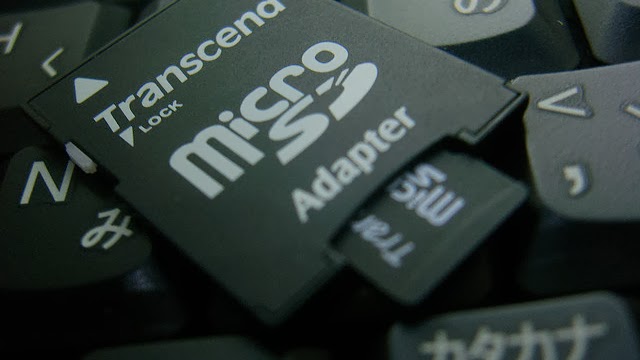
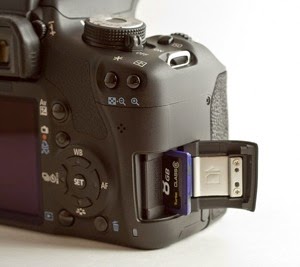
In current scenario, where digital camera is getting very popular because of its many advance features and easy to use mechanism, the need to manage the clicked photo is too getting complex day by day. Though, these highly advance digital cameras allow you to capture unforgettable memories in the form of photos and store it into different sort of memory cards such as SD Card, Micro SD Card or Mini SD Card, sometimes unfortunate incidents occur resulting in the loss of priceless photos.

Using digital cameras, lots of situations do occur which are responsible for making photographs inaccessible. Some common situations are mentioned below:-

  1. Formatting of memory card – In situations when you format the memory card inappropriately for whatever reason, either in the camera or on your PC, there is always a possibility of photo file getting corrupt. It is highly recommended to never use the camera controls while you format the card.
  2. Transferring photo images on to desktops or laptops – At times, the photographs also get corrupt during the transfer of content from memory card to desktops or laptops. In fact, in most of the occasions, it become inaccessible and throws error like images not found errors, etc.
  3. Accidental deletion of images – Just like in formatting, unintentional deletion of image files also result in the loss of photo. In fact, situations do arise where individuals fail completely to understand the functionality of various keys of camera and accidently delete photos unknowingly.
  4. Non-physical damage/data failure – There could be different scenarios, where incidents like pulling out the memory card while the camera is on or switching off the camera while data is being written too result in the loss of image files. This is where your camera would give an error.
  5. Physical damage – Incidents do take place where memory card too suffer from physical damage and ultimately make it unreadable. In such scenario, the chances of recovery depend upon the level of damage.
  6. Card affected by viruses and malwares – There are circumstances where SD card got contaminated with certain spywares result in the photo loss. These viruses remove the content from digital cameras and make it hard to find.
Besides this, the other most common causes of loss or corruption of photos from memory card are –

  • Usage of the same memory card is different cameras
  • Shooting images with a low battery
  • Switching to the Play or View mode while the photo is still being written
You must understand that these memory cards make use of complex low level sector virtualization generally termed as "wear leveling algorithm" to allocate the wear uniformly across the memory array and take full advantage of the number of write cycles it can uphold. However, there are circumstances when this algorithm partially kick in and cause loss of photos. However, whatever be the cause of the loss of photos, it is important that you make an early attempt to retrieve them as soon as possible.

However, you can easily opt for a manual method to retrieve corrupt data. Just follow the steps mentioned below to restore lost photo from SD card -

  1. Use the USB cable in order to connect your SD card to a computer.
  2. After the system detects the SD card, open it, though you must make sure that you stop using the memory card at once.
  3. After the system detects the card, ensure to examine the recycle bin on your memory card. Examine on the memory card to view whether the files are currently being stored in the recycle bin or not.

Important: Kindly note that there are chances where the system might not able to detect the memory card from the digital device. Not to worry, just continue the recovery process as mentioned and you will be able to fix the data loss.

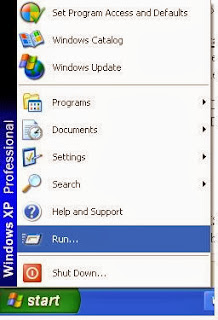
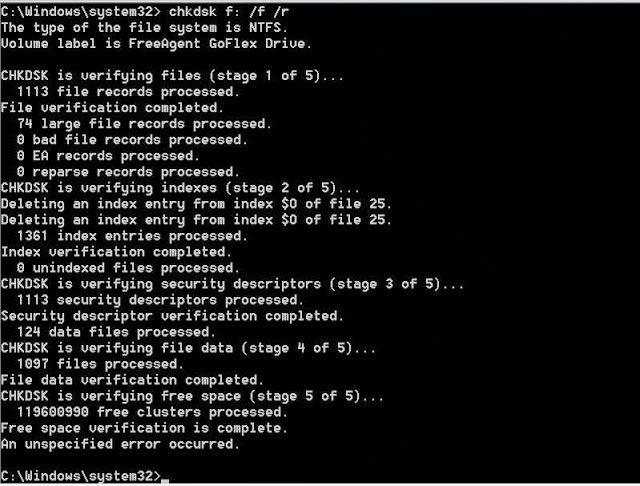
  1. Click Start and then Run.
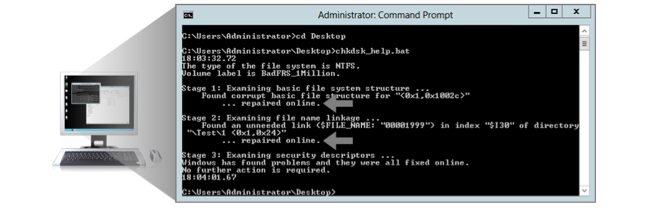
  2. Type cmd and then click OK. Type the following:
    1. chkdsk [sd card drive letter] /rThis command will Scan for and attempt the successful recovery of bad sectors
    2. chkdsk [sd card drive letter] /f This command will automatically fix file system errors on the disk
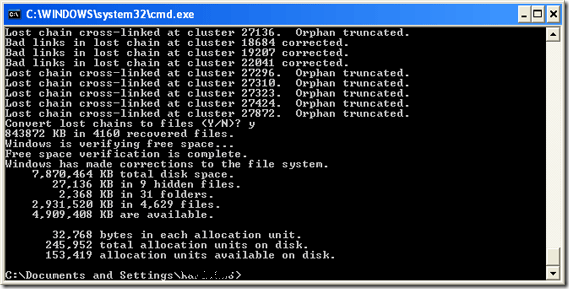
The MS-DOS chkdsk command scans, list the errors and helps in correction of those errors. In the meanwhile, while you use chkdsk command, there is always a propensity that drive remains ideal at that time. However, in the meantime when drive seems ideal just ensure you continue the scanning procedure by constantly pressing “Y”. It will start to run through entire files and directories. After the entire scanning gets over, you will be asked whether you really want to save lost chains into files and all that you require to do is answer “Yes”.

After few minutes, Chkdsk will report back with the final output. Once the scanning gets over, you will be able to have the clear preview of the detected files. Finally, just check the drive and observe your lost files stored in memory card. Nevertheless, just in case you fail to restore the lost photos, you can also take help of third party photo recovery application. With the help of different photo recovery applications that are available online, it is lot easy to download; access and one can very well restore the required lost photo from memory card.For more information, please visit our websites :  http://www.digitalphoto.freedatarecoverysoftware.org/download-free-trial.html

Retrieve Lost Data from Memory Card in just Few Minutes


We all are very much well aware of the fact that memory card is nothing more than electronic data storage data that primarily help in storing photos, audio or video files. The best aspect about these memory cards is it allows user to transfer any form of data from one electronic device to another. Today, one can easily find various sorts of memory cards featured with different storage capacity like 2 GB, 8 GB or 16 GB. Now, the important point that we need to understand is that though these memory cards are less open to mechanical damage than hard drives, but yet one can’t completely ignore about the possibility of data failures with a memory data storage card.

Sometimes, situations do arise where memory card get corrupt due to unwanted certain accidents. In fact, the most common symptoms of damage or corrupt of memory cards are -
  • Error messages like "memory card error", "card locked", "card error", or the card may not be able to be seen by your computer
  • You may view the card but not able to view images on the computer.
  • Your camera may decline and restrict you from taking additional pictures or view taken pictures.
  • Your camera or computer may prompt the message indicating you to re-format the memory card.
Now, there are various factors that are responsible for the loss of data from memory cards. Some important factors are mentioned below:-
  • Deliberate deletion of data to stock up new data
  • Unintentional deletion of certain data
  • Missing of system files on memory cards
  • Physical damage caused during plugging a USB flash memory device into a laptop of desktop computer
  • Attack of virus
In such scenario, one always looks out for a proper solution to retrieve corrupt or damaged data from memory card. In fact, individuals search for technologies to conveniently restore lost data.

However, if you are facing any such situation then, there is no need to worry. You can always opt for a manual method to retrieve corrupt data. Here is step-by-step process described to restore data from memory card -
  1. First of all connect your memory card to a computer, using a cable with a USB drive.
  2. Open the memory card and after you realize that files have been deleted from memory card, just ensure you stop using the memory card at once.
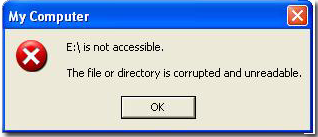
Now, there is two possibilities, one could be the memory card gets detected by the system and an another situation where you get encountered with an error box with an error message, saying -

E:\ is not accessible. The file or directory is corrupted and unreadable.

Note: In case, the system detects the card, just also ensure to examine the recycle bin on your memory card. We are aware that the memory card itself does not have recycle bin, so when you delete files from the card, the files does not always move to the recycle bin on computer. If the memory card is on device like a tablet, then a tablet too has an operating system, which is moderately similar to a computer OS. Therefore, open the device and look on the memory card to view whether the files are currently being stored in the recycle bin or not.

Moreover, talking further about solution to deal damaged memory card error, all that you need is usage of “chkdsk” command line.
  1. Click Start and then Run.
  2. Type cmd and then click OK. Type the following:
    1. chkdsk [sd card drive letter] /r – It will Scan for and attempt Recovery of bad sectors
    2. chkdsk [sd card drive letter] /f – It will Automatically Fix file system errors on the disk
The chkdsk command checks a disk for structure corruption. In the meanwhile, while you use chkdsk command, you may also notice that drive is not in use. Don’t get tensed and continue pressing “Y” to continue. It will start to run through the files and directories.

When the entire scanning gets completed, it will be asked whether you want to save lost chains into files and so you must answer “Yes”.

Chkdsk will report back what it has done, so after scanning gets over, you will be able to preview the found files. Finally, just check the drive and see your lost files stored in memory card. Nevertheless, you can also take help of third party data recovery application. Such data recovery tools are available online and one can download, access it and recover the required lost data from memory card. Visit here : http://www.memorycard.freedatarecoverysoftware.org/

© 2013 Digital Media Recovery. All rights resevered. Designed by Templateism